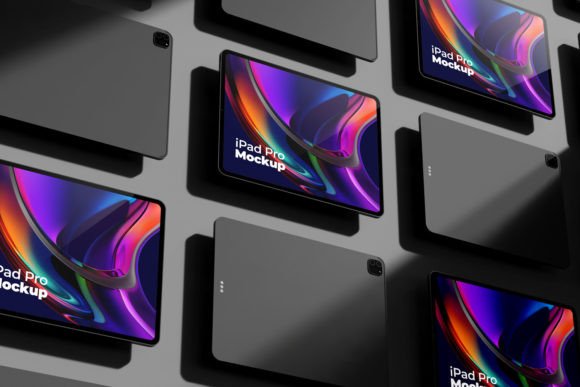
IPad Pro Screen Mockup 3D: A Professional Tool for Realistic Digital Presentations
In the fast-evolving world of digital design and marketing, visual clarity is more important than ever. Designers, marketers, and developers often need to showcase their work in a way that feels authentic and engaging to potential clients or audiences. The iPad Pro Screen Mockup 3D offers a refined solution for this challenge. With its high-resolution rendering and smart object integration, it’s become a valuable asset for professionals looking to present digital products in a lifelike context.
What Is an iPad Pro Screen Mockup 3D?
An iPad Pro Screen Mockup 3D is a digital template used to visualize how a design will appear on an actual iPad Pro device. Unlike flat images or simple screenshots, these mockups use three-dimensional modeling to replicate the physical look and feel of the device — from the screen edges to the bezels and lighting effects. This realism allows users to place their applications, websites, or other digital content into a virtual environment that closely mirrors real-world usage scenarios.
These mockups are especially useful when presenting to stakeholders who may not be familiar with technical jargon or when demonstrating a product's usability in a tangible format. Whether you're launching a new app, promoting a website redesign, or creating educational materials, using a 3D iPad mockup can elevate your message and make your work stand out.
Key Features That Define Its Value
The iPad Pro Screen Mockup 3D by RAM STUDIO brings together several features that enhance both the presentation and workflow efficiency for creative professionals:
- High-quality resolution: The mockup is rendered at 4000 px X 2667 px dimensions with a 300 px/inch resolution, ensuring sharpness and detail even when zoomed in.
- Smart Object Integration: This feature allows for seamless replacement of the device screen with your own design without altering the rest of the mockup, streamlining the editing process significantly.
- Multi-layered Design: Each component of the mockup is organized into layers, making it easier to customize aspects like lighting, background, or screen content individually.
- Realistic Lighting and Shadows: The 3D render includes accurate reflections and shadows, which help simulate how a real iPad would interact with light in different environments.
- Compatibility: As a Photoshop file, it works well with Adobe tools and similar software, allowing for further manipulation and integration into broader design projects.
Strengths and Practical Use Cases
One of the standout strengths of the iPad Pro Screen Mockup 3D is its ability to deliver a realistic feel while maintaining a high degree of flexibility. For instance, a mobile app developer preparing a pitch deck can insert their app interface into the mockup, instantly transforming a static image into a dynamic, believable demonstration.
Similarly, educators or instructional designers might use the mockup to create tutorials or e-learning modules that show students how to navigate specific apps or platforms. Marketers can integrate brand visuals or UI/UX concepts into the device to illustrate how a campaign or platform will function in practice.
This mockup also excels in brand identity presentations. When launching a new digital product, being able to show it on a modern, sleek device like the iPad Pro helps establish a sense of professionalism and innovation. It’s particularly effective in portfolio presentations, client proposals, or social media campaigns where first impressions matter.
Usability and Workflow Integration
From a usability standpoint, the iPad Pro Screen Mockup 3D is designed with the professional user in mind. The layered structure ensures that each element is easily accessible and modifiable, reducing the time needed to adjust or reposition components. The smart object functionality is a game-changer, as it eliminates the need to manually crop or resize your content every time you update the design.
For those who frequently switch between multiple devices or screen sizes, the mockup provides a consistent baseline for comparison. You can test how your design looks on an iPad Pro next to a smartphone or laptop mockup to ensure visual harmony across platforms. This kind of cross-device consistency is essential in today’s multi-screen digital landscape.
However, it’s worth noting that some users may require a learning curve if they’re not accustomed to working with layered Photoshop files. But once the basics are understood, the mockup becomes a powerful tool for rapid iteration and presentation refinement.
Who Can Benefit Most from This Mockup?
The iPad Pro Screen Mockup 3D caters to a wide range of professionals:
- UI/UX Designers: They can use it to present app designs in a realistic setting, helping stakeholders understand the user experience better.
- Graphic Designers: Ideal for showcasing digital art, infographics, or web banners in a natural context.
- Marketers and Advertisers: Enables them to create compelling visual assets for campaigns that reflect how a product will appear on a real device.
- Educators and Trainers: Useful for illustrating digital tools and workflows in teaching environments.
- Freelancers and Small Business Owners: Offers a cost-effective way to create polished presentations without investing in expensive photography setups.
Its versatility makes it suitable for any project where visual authenticity and attention to detail are key. If you're targeting Apple users or aiming to align your brand with cutting-edge technology, this mockup can reinforce that perception effectively.
Real-World Performance and Limitations
In practical terms, the iPad Pro Screen Mockup 3D performs exceptionally well. The lighting effects and material textures give the illusion of depth and realism that’s hard to achieve with standard flat mockups. However, like all templates, it does have limitations. While the mockup is highly customizable, it still requires a certain level of technical proficiency to modify advanced elements like reflections or shadows. Users without experience in photo editing software may find themselves needing to invest time in learning basic Photoshop techniques.
Another consideration is the file size due to the high-resolution nature of the template. While this ensures quality, it can slow down performance on less powerful machines. Still, for most modern systems, this should not be a significant barrier.
Long-Term Value and Consistency
When evaluating long-term value, the iPad Pro Screen Mockup 3D holds up well. Because it supports updates and changes through smart objects, it adapts to evolving project needs. This means you can reuse the same base mockup for various iterations of your design, saving time and resources over the course of a project.
Consistency is another major plus. Whether you're working on a single design or managing a series of related visuals, having a uniform look reinforces your brand’s professionalism. The mockup ensures that every version maintains a cohesive appearance, which is crucial for branding and documentation purposes.
Comparing It to Other Device Mockups
Compared to generic device mockups or low-resolution stock images, the iPad Pro Screen Mockup 3D offers a noticeable improvement in quality and realism. Many free alternatives lack the detailed lighting and layer organization that make customization efficient. In contrast, this mockup balances accessibility with sophistication, giving users the power to tailor it to their specific needs without overwhelming them with complexity.
That said, there are situations where simpler mockups may suffice. For quick demos or informal pitches, a basic screenshot or lower-fidelity mockup could be adequate. But for polished presentations or commercial use, the extra effort required to utilize this 3D mockup is justified by the end result.
Recommendations for Getting the Most Out of the Mockup
To maximize the utility of the iPad Pro Screen Mockup 3D, consider the following tips:
- Use Smart Objects Effectively: Always place your design inside the smart object layer to maintain scalability and avoid distortion.
- Experiment with Lighting Layers: Adjust the lighting to match the mood or setting of your presentation. Soft ambient lighting can evoke calmness, while harsher lighting can highlight interactivity.
- Layer Organization: Keep your project clean by renaming and grouping layers according to function (e.g., "Screen Content", "Device Base", "Reflections").
- Combine with Other Mockups: To demonstrate cross-platform compatibility, pair the iPad mockup with smartphone or desktop versions for a unified visual story.
- Optimize for Different Uses: Save variations of the mockup with pre-set backgrounds or lighting for faster access during client meetings or portfolio reviews.
Final Thoughts on the iPad Pro Screen Mockup 3D
The iPad Pro Screen Mockup 3D is more than just a visual placeholder — it’s a strategic tool for conveying ideas clearly and professionally. Its combination of realism, flexibility, and ease of use makes it a solid choice for anyone involved in digital product development, marketing, or education. While it may require some initial setup and understanding of layered Photoshop files, the payoff in terms of presentation quality is substantial.
If your goal is to impress clients, streamline your design workflow, or create visually compelling content for digital platforms, then the iPad Pro Screen Mockup 3D is a worthwhile investment. It bridges the gap between concept and reality, offering a glimpse into how your digital creations will perform in the real world.